Page 1 of 1
My newest 3D Printing Adventures
Posted: Sat Jun 18, 2022 4:38 am
by MagickalMemories
So, I've been doing some printing. Having fun.
THEN, GW had to go and release the Chaos Knights codex.
I looked over it and liked what I saw. I already have ONE Chaos Knight conversion (there's a thread in here somewhere), so I figured WHY NOT?
But I'm NOT sending ANY more money GW's way for models. I have a 3D printer and there are a TON of cool models (many even FREE) online.
So, I downloaded a TON of Proxy Knight files.
I found an Armiger I liked and was inspired by ANOTHER file I found... Someone had a model that looked like the old Chaos Giant Spawn.
So, I had to teach myself *with the help of Google and YouTube) how to use MeshMixer.
So far, i've digitally kitbashed TWO Armigers. On the left is the first one. On the left is the second. It's just the first one, but I used the spines on the Spawn's back to create a dual row of spines for him because I wasn't very excited about the Chaos Star on the first one's back.
So, yeah. I guess this is a thing for me now. I'll be kitbashing all of my Knights, I guess.
Chaos Armigers.jpg
Eric
Re: My newest 3D Printing Adventures
Posted: Sun Jun 19, 2022 3:14 am
by gpfredette
Those look cool Eric
Re: My newest 3D Printing Adventures
Posted: Mon Jun 20, 2022 12:23 pm
by Ambience 327
Looks awesome. I have been considering learning to kitbash like this as my next "3D Printing Adventure" as well. Do you have any specific recommendations for good videos/tutorials that you found really helpful?
Re: My newest 3D Printing Adventures
Posted: Mon Jun 20, 2022 3:59 pm
by MagickalMemories
Not really. When I need to know something, I Google my problem and look at articles/videos until I find one that does what I was trying to do.
Since I don't do digital sculpting/CAD/etc., I'm not familiar with a lot of the language. So, I'm learning some of the language by finally finding the articles and learning it there.
For example, I thought I wanted to "Combine" the 2 files here. Right? Wrong. What i actually wanted was "boolean union."
Go figure. LOL
I've been using Meshmixer, because the first thing I heard on one of the 3DP Facebook groups I am in was advice on how to make it a single piece in Meshmixer.
It's a bit of a pain in the... to use, though.
I downloaded Blender, too. Haven't used it yet, though.
Eric
Re: My newest 3D Printing Adventures
Posted: Mon Jun 20, 2022 7:00 pm
by YoungWolf777
I find Meshmixer very tedious to work with. MS 3D Builder is a good option to start mashing files together, even if it's just to check scale and such. Saving as an STL of it creates a printable file w/o having to join things first as well. Keep a copy of the file in the native .3mf format and do a save as STL. Then if you need to adjust things it's still in parts in the .3mf file.
Re: My newest 3D Printing Adventures
Posted: Wed Jun 22, 2022 2:24 am
by MagickalMemories
YoungWolf777 wrote: ↑Mon Jun 20, 2022 7:00 pm
I find Meshmixer very tedious to work with. MS 3D Builder is a good option to start mashing files together, even if it's just to check scale and such. Saving as an STL of it creates a printable file w/o having to join things first as well. Keep a copy of the file in the native .3mf format and do a save as STL. Then if you need to adjust things it's still in parts in the .3mf file.
I was going to PM you, but decided to ask here. I figure there might be others interested in learning from you.
So, the thing about mashing a couple files together and saving them as an STL is that I can do THAT in even Chitubox.
The problem I have, whether in C-Box or M-Mixer is that, if that's all I do, they don't combine into one COMPLETE piece. If I go to hollow it, the .stl 'remembers" all the walls that the 2 previous pieces had, and doesn't remove them. So, you end up with closed internal cavities and a TON of crap that needs support.
Imagine if you took 3 circles, overlapped them, and saved them as an .stl.
Then, you hollowed them.
Cus that file in half, and you're looking at a Venn diagram. That's what happens.
So, what would 3D Builder do in that case? Would it leave the internal structures, or treat them like a single piece?
Thanks.
Eric
Re: My newest 3D Printing Adventures
Posted: Wed Jun 22, 2022 6:12 pm
by YoungWolf777
Archive.zip
Here's a quick test I put together to illustrate what 3D Builder does. Files are attached.
I put three separate objects together that intersect like your example above.

I saved it as .3mf format and reopened it. The objects are still in position, but definitely separate.

I then saved that same file as .stl and reopened it. All objects are merged and the resultant object is solid.
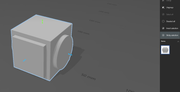
I ran into this by accident, but it turned into a happy accident for me as it's a huge time saver. If you want to do the same thing manually you would need to select all of the objects and then use Edit > Merge. This will do the same thing, but for complex objects it can take a considerable amount of time. The save as option does not. Not sure if they're different routines under the hood, but the end result is always printable.
I also run all 3D files through it to fix errors. I have a 98.5% success rate with it. The key exceptions were objects that weren't properly defined so the program did its best to fix the gap in the mesh. Generally, if 3D Builder can't fix it, it's really bad.
Lychee claims they support .3mf files, but I've never had them work at all. So for digital kitbashing this is my go-to workflow:
- Load objects in 3D builder.
- Save as .3mf file. (3D Builder's default file format)
- Get the pieces lined up where I want.
- Save again.
- Save as .stl to create a merged file for Lychee. (Or Chitubox if you're a glutton for punishment.)
- Slice & print.
The trouble you run into when trying to merge objects in a slicer and then hollow is all of the objects are still independent. You can get away with it if they are solids, but not hollow. The hollowing routine uses the mesh of the individual objects, not the resultant whole.
Hope that helps.

Re: My newest 3D Printing Adventures
Posted: Wed Jun 22, 2022 11:07 pm
by MagickalMemories
What happens to that object now if you try to hollow it?
I can combine files that easily in meshmixer or even Chitubox (Apparently, I'm a glutton... but i tried CBox, lychee AND Photon Workshop... liked CBox the most). The problems only come up when/if I try to hollow them.
If I'm printing solid, I have ZERO issues doing what you say. it's ONLY when hollowed... even if I save them as an .stl file in Meshmixer. I have to use "make solid" on them before I can hollow them.
Also on my agenda... learning how to shrink the file size (in kb) of files after I mess with them. They always SKYROCKET.
LOL
That is low priority, though, so I haven't put a ton of time into it.
Thanks, YW!
E
Re: My newest 3D Printing Adventures
Posted: Thu Jun 23, 2022 4:55 pm
by YoungWolf777
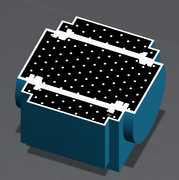
To be honest, I hadn't tried hollowing something put together like this so I tested it just now with the same file from above. You are correct, hollowing doesn't work correctly.
Without Merge applied:
With Merge applied:
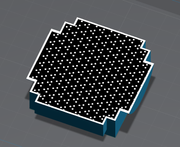
After merging and saving, you will want to reload the file as it may report holes or errors in the slicer (mine did.) 3D Builder is an excellent repair tool, especially on its own files.
When you merge you're adding more triangles to the mesh. (STL = Standard Triangle Language). It doesn't make logical sense to me why it would as you're also removing the intersecting sections of the mesh when you merge. To reduce the file size you need to "Decimate" them which has the same effect as downsampling an image. You should have similar controls as well to balance the quality of the mesh vs. the resultant file size.
Re: My newest 3D Printing Adventures
Posted: Thu Jun 23, 2022 4:58 pm
by YoungWolf777
In the example I just posted, the saved as STL file was 25 KB. The merged file was 92 KB.
Re: My newest 3D Printing Adventures
Posted: Thu Jun 23, 2022 10:38 pm
by MagickalMemories
Thanks for the follow up.
Well, I am about to start trying out Blender, which I've heard good things about. Plus, one of the Patreons I support (Hex 3D) is beginning to post Blender tutorials.
So, we'll see how THAT goes. If it goes poorly, I'll try 3D Builder.
I did Google my issue previously and, when I "decimated" it, the file seemed to lose detail, and I couldn't get it back without undoing the decimation. I was NOT happy with that! LOL
Eric
Re: My newest 3D Printing Adventures
Posted: Fri Jun 24, 2022 5:06 pm
by YoungWolf777
It is a balance. I'm not super familiar with the process, but I know several of the sculptors I support go through it for final released files to keep the filesize down.
Re: My newest 3D Printing Adventures
Posted: Sat Jun 25, 2022 2:41 am
by 3eland
Blender is dope.
Re: My newest 3D Printing Adventures
Posted: Sun Jun 26, 2022 6:21 am
by MagickalMemories
3eland wrote: ↑Sat Jun 25, 2022 2:41 am
Blender is dope.
You are too d@mned old to talk like that!
LOL
E
Re: My newest 3D Printing Adventures
Posted: Mon Jun 27, 2022 3:08 am
by 3eland
Roll with the times, Boomer. So over the top

R
MagickalMemories wrote: ↑Sun Jun 26, 2022 6:21 am
3eland wrote: ↑Sat Jun 25, 2022 2:41 am
Blender is dope.
You are too d@mned old to talk like that!
LOL
E